GoAccess web log analyzer

On the geekfarm, we frequently use GoAccess for ad-hoc web traffic analysis and monitoring. It offers both a TUI and an HTML interface.
 allinurl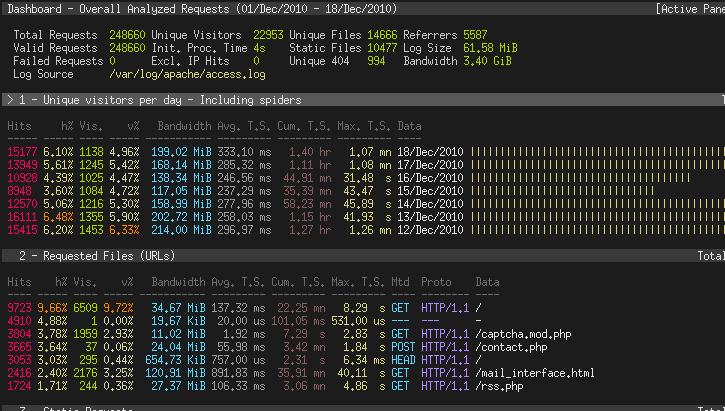

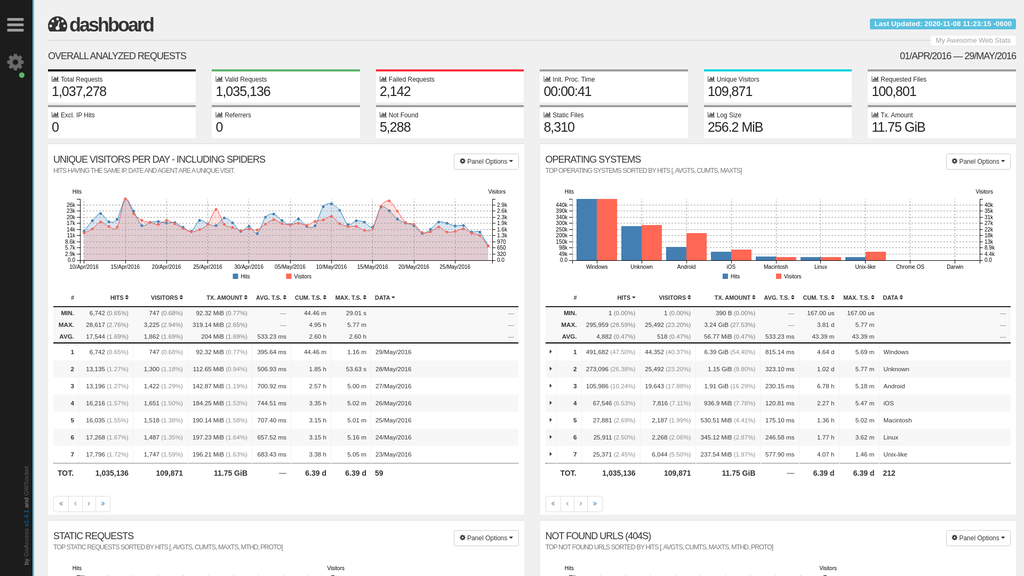
Command Line HTML report
When I want to analyze or monitor the traffic coming to Ghost, here's the command I use
goaccess /var/log/nginx/access.log --log-format "COMBINED" --sort-panel='VISIT_TIMES,BY_DATA,DESC' -o /path/to/nginx/content/report.html --real-time-html --ssl-cert=/path/to/cert.cer --ssl-key=/path/to/cert.key
Then I just navigate to the report.html file URL in my browser.
Sort Panel Options
In the "time distribution" panel, when I'm looking at a single day's data, I prefer to sort the traffic so that the latest hour is at the top. This can be accomplished using the "--sort-panel" argument.
The GoAccess man page lists the options for the "--sort-panel" argument as "<PANEL,FIELD,ORDER>". The FIELD and ORDER options are enumerated under this argument, but I didn't immediately find the list of Panel names.
I tried using the numbers that are displayed in the console, and the various names that are used in the man page and the UI. Eventually I found the list of panel names in the man page under the argument "--enable-panel":
- VISITORS
- REQUESTS
- REQUESTS_STATIC
- NOT_FOUND
- HOSTS
- OS
- BROWSERS
- VISIT_TIMES
- VIRTUAL_HOSTS
- REFERRERS
- REFERRING_SITES
- KEYPHRASES
- STATUS_CODES
- REMOTE_USER
- CACHE_STATUS
- GEO_LOCATION
- MIME_TYPE
- TLS_TYPE
That meant that the argument I needed was:
--sort-panel='VISIT_TIMES,BY_DATA,DESC'
Streaming Data
When using an HTML report with the "--real-time-html" argument, GoAccess will stream new log data to the browser using web sockets. I'm just using the default address (0.0.0.0 to listen on all available interfaces) and port (7890), so I don't need to override those values on the command line.
By default, GoAccess uses a secure web socket address (wss://). So, when starting GoAccess, I pass in the path to the "Let's Encrypt" certificate and key I'm using for Ghost.
When you load the HTML page in the browser, it will load the report that was generated at the time you started GoAccess. But, it wasn't immediately clear to me if it was connecting to the web socket or not. There are a few ways to confirm this.
First, in the upper left-hand corner, there is a configuration icon that looks like a gear with a small dot at the lower right-hand corner. If you successfully connected to the web socket, the small dot will be green. If not, it will be grey.
Second, in the upper right-hand corner is the "Last Updated" timestamp. If new data is streaming in, then the Last Updated timestamp should very quickly get updated when a new hit comes in to your server logs.
Finally, in the browser, if you open the developer tools and check out the console, you'll see failure messages with the target URL if it fails to connect.
Firewall
By default, GoAccess listens on port 7890. I couldn't access this port directly on the server due to UFW configuration.
I needed to run the following command to allow me to connect from home, replacing 'x.x.x.x' with my home IP address.
ufw allow from x.x.x.x proto tcp to any port 7890
Random Thoughts
Despite the name, "GoAccess" is not written in Go. 😄