
Introducing Keyop Messenger
keyop-messenger is a fast, lightweight, federated pub-sub messaging library for Go with at-least-once delivery guarantees, offline resilience, and mTLS security. It was designed to run efficiently on resource-constrained systems with minimal operational complexity.
I created it to be the nervous system for 'keyop', the latest generation of a distributed application I've been working on for many years.
Contents
- Why create another messaging library in Go?
- Features
- Getting Started
- Federation Topologies
- Observability
- Log File Rotation
- Maximum Message Sizes
- Reliable Delivery
- Benchmarks
- What isn't Keyop Messenger?
- See Also
This post was not created or edited by AI.
Why create another messaging library in Go?
The previous generation of keyop used Kafka for node-to-node communication, but running Kafka in the cloud for my personal project was expensive, and I had to use a different solution for intra-node communication that could tolerate being offline.
My original idea for this library was simple, publishers append lines to a log file, and subscribers run 'tail -f' on that log file. Building on the core design, I wanted:
- reliable at-least-once delivery - if a publisher gets back a success message when publishing locally, unless the disk gets corrupted, it shouldn't get lost
- federation - clients publish and subscribe to specific channels on hubs, hubs control which channels clients can access, and it must be easy to configure
- offline - local event-based activity works when the instance is not connected to a hub, reconnect with exponential back-off, all messages delivered after reconnect
- secure - mutual authentication with certificates (mTLS), each instance should have a unique self-signed cert to identify it, and there should be a simple process to generate the certs
- fast - when a client sends a message, I want to see it on my dashboards almost instantly, even when it goes through multiple hops
- small and efficient - should run with minimal resources on tiny systems
- simple - I'm not looking for another complicated system to maintain
- observability - troubleshooting should be easy, e.g. the message history is just a log file that can be grepped, and complicated multi-event processes can be debugged using correlation ids
- native go - no CGO dependencies
Go has lots of great messaging libraries, but nothing quite lined up with my requirements.
Features
keyop-messenger is a pub-sub messaging library.
It's small (~6k lines of code and ~11k lines of tests) very lightweight, and will run very comfortably on an old raspberry pi.
Similar to Kafka, it provides named channels that services can use to communicate. Processes can easily publish and/or subscribe to one or more channels.
When a message gets published to a channel, it gets written to an append-only log file on disk. If the publisher gets back a successful response from Publish(), that means the message was successfully committed to disk.
Subscribers of a channel follow the channel log file for new messages. Subscribers register a callback function method which gets called to process each message. If the callback returns with no error, the message is considered successfully processed, and the subscriber offset in the channel file is updated. If the application crashes or gets restarted after a message was successfully published, but before subscribers can finish processing it, then the message will still be waiting in the channel file, and will get picked up by subscribers on restart. There's a chance a message might be picked up twice in edge cases like this, but assuming the disk is reliable, there is a guarantee that the message will get delivered at least once to all subscribers. If the callback returns an error, it will get retried a few times with exponential back-off. If it continues to fail it will eventually get moved to the dead-letter queue.
The actual channel logs are stored as fixed-size append-only segment files. The messaging library tracks the offsets of each client so that clients can resume where they left off. Old segment files get cleaned up once all clients have consumed all the messages in the file, or after some configurable maximum amount of time has passed.
Messaging is also federated, meaning that keyop-messenger running on a client host can subscribe or publish select channels to a hub. A given instance can easily be a client or a hub or both depending on the configuration. Messaging between hosts is secured by self-signed mTLS certificates. The CN on the certificate provides the instance identity. There's a handy command line utility to generate and inspect certs. The hub configuration controls which clients can connect, and which channels they can publish and subscribe.
Federated messaging is low latency. Imagine a client publishes a message locally, and that message gets delivered to a hub on a different host, and then another client on a 3rd host picks up that message from the hub. If you are actively watching the channel logs on all three hosts at the same time, it will typically arrive so quickly in all three logs that you'll have a problem distinguishing the source from the destination.
Debugging messaging problems is simple, because the channel log files used for publishing and subscribing are just plain-text log files in .jsonl format (one json entry per line). You can tail the log files to see whether or not messages are arriving, and you can watch the offset files to see if the subscribers are picking them up. You can also check the audit log for details on connections and inbound message metadata.
Getting Started
Here's an example of how to use the library to communicate between two hosts.
The code for the example lives in the 'example' subdirectory of the project:
Certificates
keyop-messenger uses "mutual authentication", or mTLS, meaning that the client authenticates the server (hub), and the server authenticates the client. Authentication involves checking that the peer's certificate was signed by the correct certificate authority (CA). Each instance has its own certificate which uniquely identifies that instance. Having each instance identified by a unique certificate allows the server to limit which channels that client can subscribe and publish.
So, we need to start by generating some self-signed certificates. keyop-messenger has a 'keygen' command for generating the necessary certs.
Before generating host certs, we need to create a CA to sign the certs. This command will generate the ca.crt and ca.key in the current working directory.
keyop-messenger keygen ca
Now we need to create certs for the instances. This example uses two messenger instances which are both running on the same host. We'll use instance-specific cert names for authorization. Again these are generated to the current working directory.
# host 1
keyop-messenger keygen instance \
    --ca ca.crt --ca-key ca.key \
    --name host1 \
    --out-cert host1.crt \
    --out-key  host1.key

# host 2
keyop-messenger keygen instance \
    --ca ca.crt --ca-key ca.key \
    --name host2 \
    --out-cert host2.crt \
    --out-key  host2.key
Now that we have the certs, we need to copy them to host1 and host2, along with the 'ca.crt' which will be used to validate that the certs have been signed by the same CA. Do not copy ca.key to the hosts or someone could use it to generate more certs. Keep ca.key safe and don't lose track of it in case you want to create more instance certs in the future. It's best that every instance has its own cert so you can control which channels that specific instance can publish and subscribe.
On the instance hosts, you can keep the cert files anywhere you want--you just need to adjust the configuration for where you plan to keep them.
Payload Registration
keyop-messenger handles go structs serialization and deserialization in message payloads. You just need to register the payloads to publish and receive the data. To start, just create a struct for the message you want to send. Here's a simple example (the 'count' field is useful for this example):
type Alert struct {
        Details string `json:"message"`
        Count   int    `json:"count"`
}
Then, just register the payload with the messenger before sending or receiving the message. You can register as many payloads as you need. Here's how to register a payload:
err := m.RegisterPayloadType("com.example.alert.v1", Alert{})
When publishing the message, declare the payload type:
alert := Alert{Details: "system problem!"}
err := m.Publish(ctx, "alerts", "com.example.alert.v1", alert)
And then when a subscriber receives the message, check the payload type:
if msg.PayloadType == "com.example.alert.v1" {
	// safely verify the payload type before using it
	a, ok := msg.Payload.(Alert)
	if !ok {
		logger.Error("failed to verify Alert payload type")
		return nil
	}
	// log the event details with event metadata from the message
	logger.Info("received alert!",
		"details", a.Details,
		"origin", msg.Origin,
		"timestamp", msg.Timestamp.Format("2006-01-02 15:04:05"),
	)
}
It is a good practice to include a version in your payloads if you expect that they might change over time, and if you may ever have multiple versions of the payload in flight. Then, in the code that handles the payloads, you can check the payload type and version and handle it appropriately. For small projects, this might be overkill.
Federation Round-Trip Happy Path
See also: Federation Topologies
The diagram below shows the happy path for a federation message with a hub on host 1 and a client on host 2. In this case, a publisher on client host 2 publishes a message to a local channel on host 2, and then host 2 forwards the message on that same channel to the hub on host 1, and then a subscriber on host 1 processes the message from the local channel on host 1.
Host 1 - Hub + Subscriber
host1 will be acting as the 'hub', meaning that it listens on a port (7740) and waits for clients to connect. It also subscribes to the local 'alerts' channel, and registers a callback to be invoked for every message that arrives on the channel.
In this example config, there are no pub or sub channels defined for the AllowedPeers, so clients are allowed to publish and subscribe to any channels they request.
package main

import (
	"context"
	"log/slog"
	"path"

	messenger "github.com/wu/keyop-messenger"
)

// host1 is acting as the 'hub'
func host1(ctx context.Context, logger *slog.Logger, baseDir string) {

	tmpDir := path.Join(baseDir, "host1")
	logger.Info("host1: starting", "dataDir", tmpDir)

	// listen on port (7740) and waits for clients to connect
	cfg := &messenger.Config{
		Storage: messenger.StorageConfig{
			DataDir: tmpDir,
		},
		Hub: messenger.HubConfig{
			Enabled:    true,
			ListenAddr: ":7740",
			// no channels are specified for 'host2', so it can publish and subscribe to any channels it specifies
			AllowedPeers: []messenger.AllowedPeer{
				{
					Name: "host2",
				},
			},
		},
		TLS: messenger.TLSConfig{
			Cert: path.Join(tmpDir, "cert", "host1.crt"),
			Key:  path.Join(tmpDir, "cert", "host1.key"),
			CA:   path.Join(tmpDir, "cert", "ca.crt"),
		},
	}
	cfg.ApplyDefaults()

	// Create a new instance of the messenger for this instance.
	// Without WithLogger(...) the messenger uses a no-op logger that discards ALL
	// output — including dead-letter and decode errors. Always pass a real logger.
	m, err := messenger.New(cfg, messenger.WithLogger(logger))
	if err != nil {
		panic(err)
	}
	defer func() {
		if err := m.Close(); err != nil {
			logger.Error("failed to close messenger", "error", err)
		}
	}()

	// Register each of your payload types for typed decoding.
	if err := m.RegisterPayloadType("com.example.alert.v1", Alert{}); err != nil {
		panic(err)
	}

	// Subscribe to the local 'alerts' channel, and run the callback on each message that arrives there.
	// The subscriber ID is used when recording your local offset in the channel log.
	logger.Info("host1: subscribing to alerts topic on worker-1")
	err = m.Subscribe(ctx, "alerts", "worker-1", func(_ context.Context, msg messenger.Message) error {

		// check the payload type/version and respond accordingly
		if msg.PayloadType == "com.example.alert.v1" {
			// safely verify the payload type before using it
			a, ok := msg.Payload.(Alert)
			if !ok {
				logger.Error("failed to verify Alert payload type")
				return nil
			}

			// Just log the event details
			logger.Info("host1: received",
				"details", a.Details,
				"origin", msg.Origin,
				"service", msg.ServiceName,
				"timestamp", msg.Timestamp.Format("2006-01-02 15:04:05"),
				"count", a.Count,
			)
		}

		// Return nil to Ack the message, and allow the offset to be advanced.
		// Returning an error will cause the message to be retried after a backoff period.
		return nil
	})
	if err != nil {
		logger.Error("host1: failed to subscribe", "error", err)
		panic(err)
	}
	logger.Info("host1: subscribed successfully")

	logger.Info("host1: listening for messages from host1")
	<-ctx.Done()
	logger.Info("host1: shutting down")
}
I've built the config in code here so the paths can be built dynamically, but if you prefer to use a config file, it would look like this:
storage:
  data_dir: /tmp/keyop-messenger-example/host1
hub:
  enabled: true
  listen_addr: ":7740"
  allowed_peers:
  - name: host2
tls:
  cert: /tmp/keyop-messenger-example/host1/cert/host1.crt
  key: /tmp/keyop-messenger-example/host1/cert/host1.key
  ca: /tmp/keyop-messenger-example/host1/cert/ca.crt
And then to load the config file:
cfg, err := messenger.LoadConfig("host1.yaml")
Host 2 - Client + Publisher
host2 is acting as the 'client', meaning that it connects to the host1 hub on port (7740). In this case it only publishes a single channel to host1, the 'alerts' channel. So, any messages that get sent to the local 'alerts' channel on host2 will automatically get forwarded to the 'alerts' channel on host1.
host2 also registers a payload type for the Alerts struct (since this is a different messenger instance communicating with the messenger instance for host1), and then starts publishing a message every second.
package main

import (
	"context"
	"log/slog"
	"path"
	"time"

	messenger "github.com/wu/keyop-messenger"
)

// host2 is acting as the client
func host2(ctx context.Context, logger *slog.Logger, baseDir string) {

	tmpDir := path.Join(baseDir, "host2")
	logger.Info("host2: starting", "dataDir", tmpDir)

	// connect to the hub on 'localhost' and subscribe to the 'alerts' channel.
	cfg := &messenger.Config{
		Storage: messenger.StorageConfig{
			DataDir: tmpDir,
		},
		Client: messenger.ClientConfig{
			Enabled: true,
			Hubs: []messenger.ClientHubRef{
				{
					Addr: "localhost:7740",
					Publish: []string{
						"alerts",
					},
				},
			},
		},
		TLS: messenger.TLSConfig{
			Cert: path.Join(tmpDir, "cert", "host2.crt"),
			Key:  path.Join(tmpDir, "cert", "host2.key"),
			CA:   path.Join(tmpDir, "cert", "ca.crt"),
		},
	}
	cfg.ApplyDefaults()

	// Create a new instance of the messenger for this instance.
	// Without WithLogger(...) the messenger uses a no-op logger that discards ALL
	// output — including dead-letter and decode errors. Always pass a real logger.
	logger.Info("host2: creating messenger instance", "config", cfg)
	m, err := messenger.New(cfg, messenger.WithLogger(logger))
	if err != nil {
		logger.Error("failed to create messenger", "error", err)
		panic(err)
	}
	logger.Info("host2: messenger created successfully")
	defer func() {
		if err := m.Close(); err != nil {
			logger.Error("failed to close messenger", "error", err)
		}
	}()

	// Register payload types for typed decoding.
	if err := m.RegisterPayloadType("com.example.alert.v1", Alert{}); err != nil {
		logger.Error("failed to register payload type", "error", err)
		panic(err)
	}

	count := 0
	for {
		select {
		case <-ctx.Done():
			logger.Info("host2: shutting down")
			return
		default:
			// Publish to local channel with service identification.
			pubCtx := messenger.WithServiceName(ctx, "monitor-service")
			logger.Info("host2: publishing message", "service", "monitor-service")

			count++
			alert := Alert{Details: "system problem!", Count: count}
			// send the data using the registered payload type.   Blocks until write is confirmed to disk.
			if err := m.Publish(pubCtx, "alerts", "com.example.alert.v1", alert); err != nil {
				slog.Error("failed to publish message", "error", err)
			}
			time.Sleep(time.Second)
		}
	}
}
Again, I built the config from code, but here's the equivalent config:
storage:
  data_dir: /tmp/keyop-messenger-example/host2
client:
  enabled: true
  hubs:
    - addr: "localhost:7740"
      publish:
      - "alerts"
tls:
  cert: /tmp/keyop-messenger-example/host2/cert/host2.crt
  key: /tmp/keyop-messenger-example/host2/cert/host2.key
  ca: /tmp/keyop-messenger-example/host2/cert/ca.crt
Running the Example
You can access the code in the example subdirectory of keyop-messenger. It contains an easy-to-use script to automate generating the necessary certs and starting the instances locally:
Start it up using the 'run.sh' script. Once it's running, you can shut it down by hitting ctrl+c. Here's an example of the output:
--(1:wu@navi:#)-- ./run.sh                                                                                                                                                                                                           -[main]-
Generating CA keys
Subject:     CN=keyop-ca
Valid from:  2026-06-21T23:05:50Z
Valid until: 2028-06-20T23:05:50Z
Fingerprint: SHA-256:1298929aa6512057a917e6587fda1892f36c53317e09b27e5f3f4981c2fbf15b
Generating host1 keys
Subject:     CN=host1
Valid from:  2026-06-21T23:05:50Z
Valid until: 2028-06-20T23:05:50Z
Fingerprint: SHA-256:a2f7d708f625716733a47004f2bfb5087f4e2300c040a7ffb926fcfe1778ea7a
Generating host2 keys
Subject:     CN=host2
Valid from:  2026-06-21T23:05:50Z
Valid until: 2028-06-20T23:05:50Z
Fingerprint: SHA-256:dbf2f4c8b308b17ac5e63aa741e3d4ebc0af51720cf16975df0d5100457473b1
Building example
2026/06/21 16:05:51 INFO host2: starting dataDir=/tmp/keyop-messenger-example/host2
2026/06/21 16:05:51 INFO host1: starting dataDir=/tmp/keyop-messenger-example/host1
2026/06/21 16:05:51 INFO host2: creating messenger instance config="&{Storage:{DataDir:/tmp/keyop-messenger-example/host2 SyncIntervalMS:0 CompactionThresholdMB:256 MaxChannelSizeMB:0 RetentionAge:0s OffsetFlushIntervalMS:0} Subscribers:{MaxRetries:0x77bdcc8c6170} Hub:{Enabled:false ListenAddr: AllowedPeers:[] FedClientOffsetTTL:168h0m0s} Client:{Enabled:true Hubs:[{Addr:localhost:7740 Subscribe:[] Publish:[alerts]}]} TLS:{Cert:/tmp/keyop-messenger-example/host2/cert/host2.crt Key:/tmp/keyop-messenger-example/host2/cert/host2.key CA:/tmp/keyop-messenger-example/host2/cert/ca.crt ExpiryWarnDays:30} Federation:{ReconnectBaseMS:500 ReconnectMaxMS:60000 ReconnectJitter:0.2 SendBufferMessages:10000 MaxBatchBytes:4194304} Dedup:{SeenIDLRUSize:100000} Audit:{MaxSizeMB:100 MaxFiles:10}}"
2026/06/21 16:05:51 INFO host1: subscribing to alerts topic on worker-1
2026/06/21 16:05:51 INFO host1: subscribed successfully
2026/06/21 16:05:51 INFO host1: listening for messages from host1
2026/06/21 16:05:52 INFO federation: hub accepted publish connection peer=host2 addr=[::1]:56754
2026/06/21 16:05:52 INFO host2: messenger created successfully
2026/06/21 16:05:52 INFO host2: publishing message service=monitor-service
2026/06/21 16:05:52 INFO host1: received details="system problem!" origin=host2 service=monitor-service timestamp="2026-06-21 23:05:52" count=1
2026/06/21 16:05:53 INFO host2: publishing message service=monitor-service
2026/06/21 16:05:53 INFO host1: received details="system problem!" origin=host2 service=monitor-service timestamp="2026-06-21 23:05:53" count=2
2026/06/21 16:05:54 INFO host2: publishing message service=monitor-service
2026/06/21 16:05:54 INFO host1: received details="system problem!" origin=host2 service=monitor-service timestamp="2026-06-21 23:05:54" count=3
2026/06/21 16:05:55 INFO host2: publishing message service=monitor-service
2026/06/21 16:05:55 INFO host1: received details="system problem!" origin=host2 service=monitor-service timestamp="2026-06-21 23:05:55" count=4
2026/06/21 16:05:56 INFO host2: publishing message service=monitor-service
2026/06/21 16:05:56 INFO host1: received details="system problem!" origin=host2 service=monitor-service timestamp="2026-06-21 23:05:56" count=5
2026/06/21 16:05:57 INFO host2: publishing message service=monitor-service
2026/06/21 16:05:57 INFO host1: received details="system problem!" origin=host2 service=monitor-service timestamp="2026-06-21 23:05:57" count=6

... I hit ctrl+c here ...

^C2026/06/21 16:05:57 INFO host1: shutting down
2026/06/21 16:05:57 WARN federation: client disconnected, reconnecting hub=localhost:7740 unacked_bytes=0
2026/06/21 16:05:58 ERROR federation: client reconnect failed err="federation: client open publish stream localhost:7740: rpc error: code = Unavailable desc = connection error: desc = \"transport: Error while dialing: dial tcp 127.0.0.1:7740: connect: connection refused\"" attempt=1
2026/06/21 16:05:58 INFO host2: shutting down
2026/06/21 16:05:58 WARN removing temp directory path=/tmp/keyop-messenger-example
Federation Topologies
There are many patterns you can use to connect keyop-messenger instances:
- a given instance can act as a client and/or a hub
- clients can subscribe and publish to multiple channels on hubs
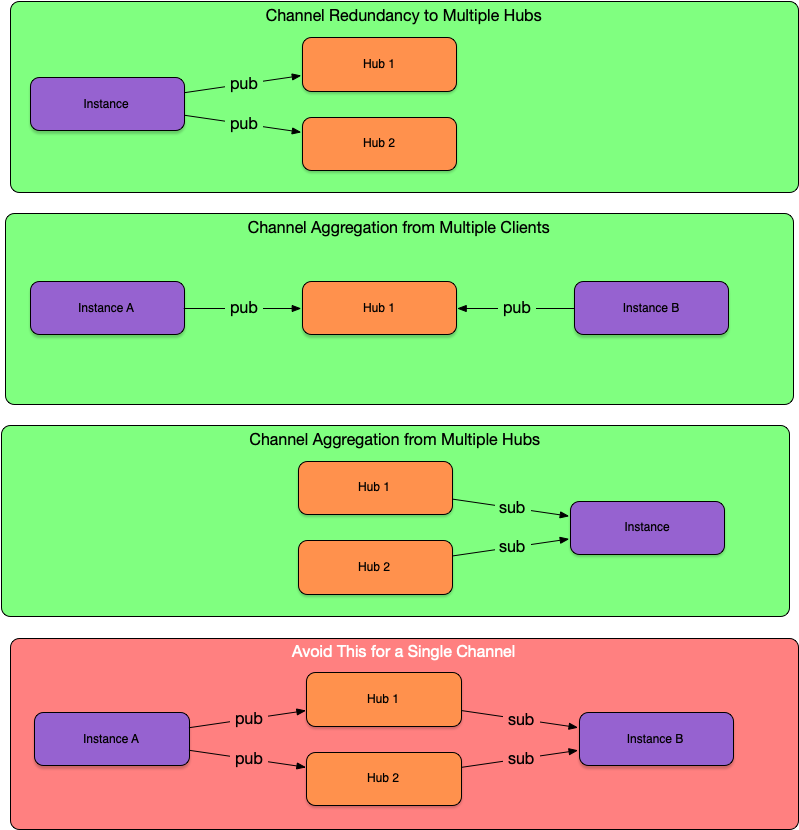
- a client can publish a channel to multiple hubs for redundancy
- multiple clients can publish a channel to a single hub to aggregate data
- clients can subscribe to a channel on multiple hubs to aggregate data
- a client can safely subscribe to a channel on a hub, and also publish to that same channel on the hub
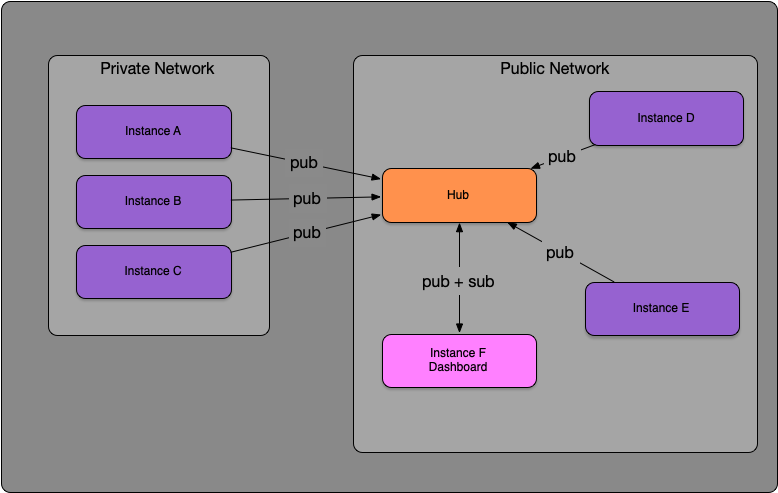
I use a basic star topology for keyop:
- A hub in the cloud on a public IP where data is aggregated
- Raspberry Pis on a private network react to events locally, and also connect to the hub and publish sensor data and other events
- Various hosts in the cloud feed metrics and other events to the hub
- Dashboard connects to the hub and subscribes to channels to display aggregate data
If you have a client that publishes to multiple hubs for redundancy, beware that any client that pulls that same channel from more than one of those hubs will receive duplicate messages. As long as everything is flowing smoothly, duplicates will generally be skipped by the in-memory LRU cache of recently-seen message IDs. But if, for example, one of the hubs goes offline for a while, and if either the LRU cache gets fully replaced on the subscriber or the subscriber instance gets restarted and loses the in-memory cache, then when the hub comes back online, you'll get a replay of all the old messages. Even when duplicates are skipped, they will still be sent across the network.
Here's a diagram illustrating some patterns for individual channels. Note that the arrows indicate the direction of the connection (client to hub), not the direction of the message flow.
Observability
In the storage data directory, you will find three directories:
- The
channelsdirectory will have one subdirectory per channel. The subdirectory will contain one or more .jsonl channel log files, with one json message per line. Each message has a v7 uuid. You can easily grep through the files to find messages. Each channel also has achannelname.dead-lettersubdirectory underchannels, which shows messages that failed to be successfully processed after retries.
- The
subscribersdirectory will also have one subdirectory per channel. The channel will contain the offset file for each subscriber, namedworkername.offset. This is the offset that is used to seek to the end of the previously processed messages.
- The
auditdirectory will contain theaudit.jsonlfile. This logs federated messages and events. For messages that are being published, the elapsed time is also logged, which records the time between when the message was sent and the receipt of the ack (including the time it took to commit the message to disk on the remote host). Messages may be sent in batches, in which case the elapsed time will reflect the batch elapsed time.
There is also a Stats() method which returns a point-in-time snapshot of runtime metrics covering the four golden signals — traffic, saturation, errors, and latency — per channel and instance-wide. When federation is enabled, it also reports per-hub health: connection state, reconnect counts, unacked bytes, and client-hub round-trip latency (with per-peer detail on the hub side).
The path the message took through the federation is recorded on the message envelope route field. This is the list of TLS identities (certificate CNs) of the instances that handled it. This field is useful for debugging, but its primary purpose is preventing a loop: a message is never forwarded to an instance that is already listed in the route.
Log File Rotation
Channel logs are rotated when they reach storage.compaction_threshold_mb, which defaults to 100.
Old channel log files get removed when all the subscribers have consumed them. The server keeps track of the subscribers' offsets in each channel, so it knows which files have been fully consumed by all subscribers.
But this means that a single lagging or stopped consumer prevents the segments from being removed.
To prevent this from consuming all available disk space, the default configuration only preserves the last 10 channel log files, including the active one. The default max size of the channel log file is 100MB, so by default, the server will hold on to up to 1GB of logs for each channel.
Two config options control this force-eviction. If either limit is exceeded, the oldest channel log is removed:
storage.max_files— hard cap on number of channel log files to keep - defaults to 10, use 1 to keep only the active file, use 0 for unlimitedstorage.retention— maximum age of retained messages - not set by default - accepts a day unit, e.g.7dor168h
Any consumer with unread messages that were deleted will skip past past them on its next read and start at the oldest available message.
Audit logs are automatically rotated when they reach audit.max_size_mb, which defaults to 100. By default it will preserve the last audit.max_files rotated files, which defaults to 10.
storage:
  compaction_threshold_mb: 100
  max_files: 10
  retention: 30d
audit:
  max_size_mb: 100
  max_files: 10
Maximum Message Sizes
keyop-messenger supports a maximum message size of 10MiB. This is not currently configurable. keyop-messenger supports sending attachments this large, but it is not optimized for it.
The maximum message size that can be sent to a peer is controlled by federation.max_batch_bytes. If a single message exceeds this on the receiving side, it is logged and then skipped. The sender receives an ack so it advances past the message and the connection stays alive.
The default value of federation.max_batch_bytes is 4 MiB. Adjust in config if your payloads are larger:
federation:
  max_batch_bytes: 8388608  # 8 MiB
Set to 0 to disable the limit, but note this will fall back to the maximum message size limit restriction.
If you want to send binary attachments in the payload, you can base64 encode them first, e.g.:
encodedData := base64.StdEncoding.EncodeToString(data)
Note that the attachment data will occupy space in the channel logs on every system they pass through until they get rotated (see Log File Rotation).
Also, since the channel logs are in .jsonl format, large messages will be stored on a single line in the log file. Most modern unix tools deal with very long lines, but some tools may have issues, e.g. sed, awk.
Reliable Delivery
Originally, one of my goals for this project was to take every possible step to make sure my data wouldn't get lost. But that comes with significant costs.
Preventing Unbounded Disk Space Growth
Old channel log files get removed when all the subscribers have consumed them. This is possible because the server keeps track of the subscriber's offsets in each channel. If a subscriber doesn't connect for a long time, and if the server never deletes undelivered messages, then the server would potentially hold on to all the unconsumed messages until the disk fills.
To prevent this, the default configuration only keeps the last 10 channel log files. The default max size of the channel log file is 100MB, so the server will hold on to up to 1GB of logs for each channel. To change the default, see Log File Rotation.
Trading Durability for Speed
By default, keyop-messenger performs an fsync after every publish, and also after every subscriber offset update. This ensures maximum durability, so that if a crash happens, as long as the disk is not corrupt, your data should be safe. But doing this significantly limits throughput as volume grows.
To increase throughput, you can switch to using periodic sync intervals:
offset_flush_interval_ms(Subscribing): A non-zero value flushes client offset files periodically. If a crash occurs before the sync, messages published since the previous sync may be redelivered upon restart. In practice, this is typically not a significant risk since it would typically be a small number of messages over a short period of time, and there is always a chance that a message might be delivered twice.sync_interval_ms(Publishing): A non-zero value flushes channel log files periodically. Setting this to a non-zero value introduces a risk of losing message since the last sync if the system crashes before the sync occurs.
If your data is not critical (e.g. sensor readings like temperature, where missing a few data points in a relatively rare system crash scenario is probably not an issue), then I recommend setting both values to 200ms to reduce the performance cost.
storage:
  data_dir: ~/.keyop/msgs
  offset_flush_interval_ms: 200
  sync_interval_ms: 200
Kafka solves this problem by replicating data to multiple nodes, so even if one node crashes, the data is still available on the other nodes. But keyop-messenger always delivers messages to a local channel file first, and then publishes to remote hubs from the local channel file, so it relies on a local fsync to ensure the data was persisted to the local disk.
Benchmarks
With sync_interval_ms and offset_flush_interval_ms set to 0 for maximum safety and durability:
| Action | Ops/sec | Time per Op |
|---|---|---|
| Publish message | 400 | 2.5 ms |
| Subscribe | 200 | 6 ms |
| Federated Round-Trip | 100 | 10 ms |
With sync_interval_ms and offset_flush_interval_ms set to 200ms:
| Action | Ops/sec | Time per Op |
|---|---|---|
| Publish message | 110,000 | 10 µs |
| Subscribe | 15,000 | 70 µs |
| Federated Round-Trip | 9,000 | 120 µs |
Refer to Trading Durability For Speed for more information.
Times recorded on an Apple M2 Max. You can test this on your own machine by running: make bench
Benchmarks for the round-trip message path exclude network travel time since the two messenger processes were measured running on the same host.
What isn't Keyop Messenger?
Here are some things that keyop-messenger does NOT try to solve:
- exactly-once delivery - A message may be delivered to a subscriber more than once. The subscriber needs to handle idempotency.
- client-specified offsets - Clients can't specify where they want to start in the log. On the initial subscription, they start with the first new event that arrives in the local channel after they subscribed. If they previously subscribed and then reconnect, they pick up where they left off. If you don't care about history and only want to see new messages on a hub after connecting, there is an ephemeral client.
- consumer groups - Each client gets their own offset. Multiple workers can't reliably share the same offset.
- time sync (federation) - The originating system's clock is used to populate the date and time on the message field. If system clocks are not in sync, events that happen at the exact same time on different systems would have different timestamps.
- message ordering across hosts (federation) - Messages are stored in the order they arrive on a given hub, not by the time they were created or initially sent. Clients may receive messages from one host before messages from another that were actually sent earlier.
- quorum / consensus (federation) - Each node operates entirely on local state. During a partition, nodes continue independently. There's no coordination to decide which node's view is authoritative. In terms of CAP theory, keyop-messenger is squarely in the AP camp.
- see also: Federation Topologies